
If you are an Integrity Data customer and have installed our software, only to realize that
you are not using any of our products please follow these instructions to remove the
software from your Dynamics GP environment:
Step 1. Uninstall the Integrity Data Software using the Windows Apps and features:
a. Select Integrity Data Dynamics GP Setup (Formerly GP 2018)
b. Click Uninstall
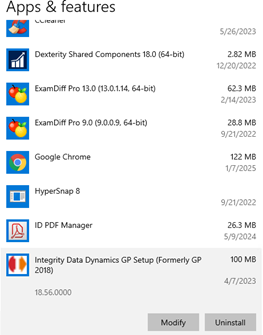
Step 2. Review the Dynamics GP folder and confirm that all files have been removed:
a. A list of all Dictionaries, .dll’s and other files are listed below
b. Review the list of products in the .set file and confirm they are no longer
listed. Refer to list of products below
Step 3. Remove the following from the Addins section of the Dynamics.exe.config a. Note that these will be included in the Dynamics and the Dynamics Web Client
<addin name=”IDEmailSuite”
type=”Integrity.Email.Addin.GPAddIn,Integrity.Email.Addin,Version=18.0.0.2,Culture
=neutral,PublicKeyToken=ac5d14cfdc907c65″/>
<addin name=”IntegrityIDCS”
type=”Integrity.IDCS.Addin.IDCSAddin,Integrity.IDCS.Addin,Version=1.0.0.0,Culture
=neutral,PublicKeyToken=be43fcede3ced22e”/>
<addin name=”IDKeyManagerAddIn”
type=”Integrity.Registration.Addin.GPAddIn,Integrity.Registration.Addin,Version=18.
5.0.0,Culture=neutral,PublicKeyToken=b7ed37edf026e3bc”/>
Software File Details:
| Feature Name | Filename | ID | Version |
| Employee Email Suite | EES.DIC | 5974 | 18.2.59 |
| Comprehensive Leave Manager | ELM.DIC | 5627 | 18.4.53 |
| Enhanced Retirement Plans | ERP6492.DIC | 6491 | 18.4.53 |
| Life Insurance Tax Calculator | GTLI6833.DIC | 6833 | 18.4.49 |
| Employee Accounts and Splits | HRMSSEXT.DIC | 4959 | 18.4.51 |
| Integrity Data Activation | IDA6537.DIC | 6537 | 18.0.127 |
| Integrity Data Cloud Services | IDCS7984.DIC | 7984 | 18.4.75 |
| Mid Pay Period Rate Changes | MPR6490.DIC | 6490 | 18.4.49 |
| Negative Deductions Enhancement | NDE7224.DIC | 7224 | 18.4.49 |
| Negative Payroll Transactions | NEGPAY.DIC | 5333 | 18.4.47 |
| Overtime Hours Rules | OHR6489.DIC | 6489 | 18.4.49 |
| Paycheck “What If” Calculator | PWC6759.DIC | 6759 | 18.4.47 |
| * HRM Solution Series | HRMSS.DIC | 1911 | 18.4.117 |
| * Payroll Integration to Payable | PIP.dic | 4522 | 18.4.103 |
| * Certification Manager | CLTM.DIC | 4933 | 18.4.103 |
| * Employee Health and Wellness | EHW.DIC | 4955 | 18.4.103 |
| Application.EmployeeEMailSuite.dll | 18.2.59.0 | ||
| Application.IdcsConnector.dll | 18.4.75.0 | ||
| Application.IntegrityDataActivation.dll | 18.0.127.0 | ||
| Integrity.CloudServices.ServiceHelpers.dll | 1.0.17.0 | ||
| Integrity.Email.Addin.dll | 18.0.0.2 | ||
| Integrity.Email.Addin.Smtp.exe | 1.0.0.0 | ||
| Integrity.GP.Admin.Client.exe | 1.0.11.0 | ||
| Integrity.GP.Admin.Client.exe.config | |||
| Integrity.GP.Admin.ClientRestart.exe | 1.0.11.0 | ||
| Integrity.IDCS.Addin.dll | 1.0.0.0 | ||
| Integrity.Registration.Addin.dll | 18.5.1.0 | ||
| Integrity.Registration.Constructor.dll | 2.1.1.0 | ||
| Integrity.PaySummary.exe | 1.0.0.0 | ||
| Integrity.PaySummary.exe.Config | |||
| SL Designer Leave Reports 2016-2018.xml |
| Smartlist builder eone Leave Reports.xml | |||
| Install file version and the version in Programs and Features | |||
| Installer | Integrity-Data-GP-2018-Setup.exe | 18.64.0000 | |
| Purpose | Version | ||
| Cutover/Sync | Newtonsoft.Json.dll | 13.0.3.27908 | |
| System.Text.Json.dll | 7.0.323.6910 | ||
| System.Text.Encodings.Web.dll | 7.0.22.51805 | ||
| Microsoft.Bcl.AsyncInterfaces.dll | 7.0.22.51805 | ||
| SQLHelper.dll |
Questions / Resources
If you have questions or comments please email support@integrity-data.com.
Last Review: 01/14/2024
Leave A Comment