
KB15-013
The Payroll Tax Payments window is where all periodic and quarterly data is sent to the Integrity Data system. Payroll documents that have been posted before Tax Payment product activation will not be seen in this window. Please ensure that the product is activated before posting payroll documents.
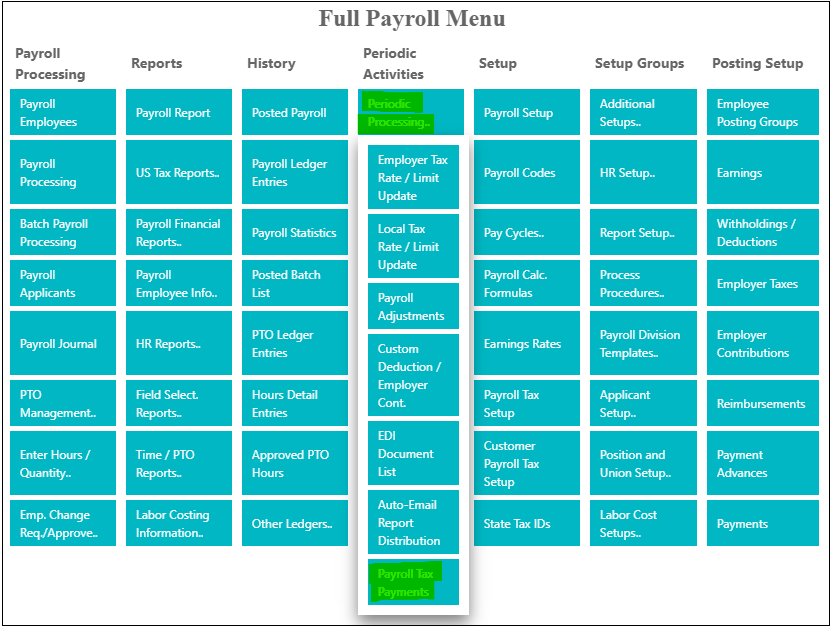
Periodic Payroll Processing
After posting each payroll or batch, go to the Full Payroll Menu, select Periodic Processing under the Periodic Activities column. Select Payroll Tax Payments at the bottom of the dropdown menu.
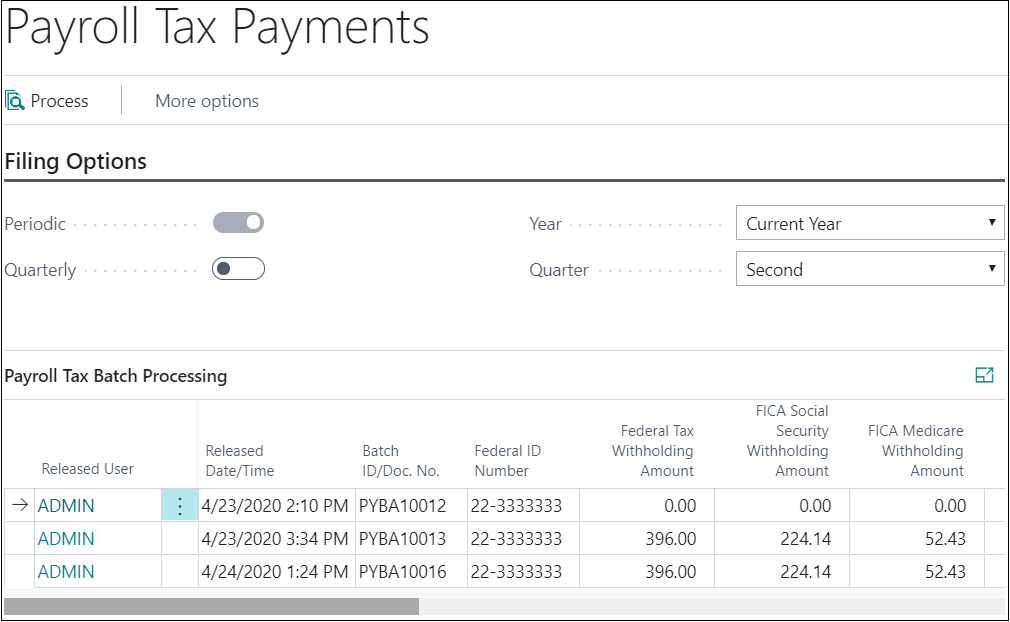
You will select the batch by clicking on it. You will then process by clicking on the process button. This button is used to submit the periodic or quarterly records to the Integrity Data System. Your data has now been submitted.
Questions / Resources
If you have questions or comments, please email support@integrity-data.com
If you would like to search for information and resources for Integrity Data products, check out the following sites:
- Knowledge Base: https://www.integrity-data.com/knowledge-base/
- Videos: https://www.integrity-data.com/video-library
Last Review: 5/6/2021 – Revision: 0.0
Applies To: Payroll NOW
Keywords: Payroll, Tax
Categories: Payroll NOW, Tax Services
Leave A Comment