
To set up the Job Queue to email check stubs instead of during processing, follow these steps.
The employee card must have the box checked that says “E-mail Check Stub from posted document”

Open the Job Queue Entry Card and Select New
Object type to Run = Codeunit
Object ID to Run = 14141113
Parameter String = EMAILCHECKSTUB (This is critical)
PRO TIP: Set the Recurrence to run every day that way if there is a payroll document processed off cycle it will be picked up.

Please note that the first time this job is run it will send everything that has not been sent for the past quarter to the employees. After the initial run it will only send what has not been sent after that.
If you are using an older version of the software and you receive the following error message:
Record(472) is not compatible with Codeunit.Run(Record(14141147))
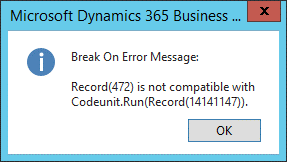
You will need to run Object ID 14141111 instead of 14141113

Questions / Resources
If you have questions or comments please email support@integrity-data.com.
Last Review: 06/14/2024
Leave A Comment