
I-9s: API Tokens and I-9 Submission via Integrity-Data’s HRP
1. Navigate to https://www.nationalcrimesearch.comT. To get started, you will enter your user’s email here. Afterwards you will need to complete the subsequent prompts for your user information (this will be a paid membership “Per User,” and the API Token received can only be used by that individual user).

2. Once you have logged in, click your name at the top-right of the screen.

3. Click “Account Settings”

4. Scroll down to find your API Information. Copy this information (CTRL/Command + C) to your clipboard.

5. Log in to the Integrity-Data HRP.

6. Click “HR Admin”

7. Scroll to the “User List” menu item.

8. Find your User Profile and click the row to open up the full profile (use the filter grid to narrow your search if needed).

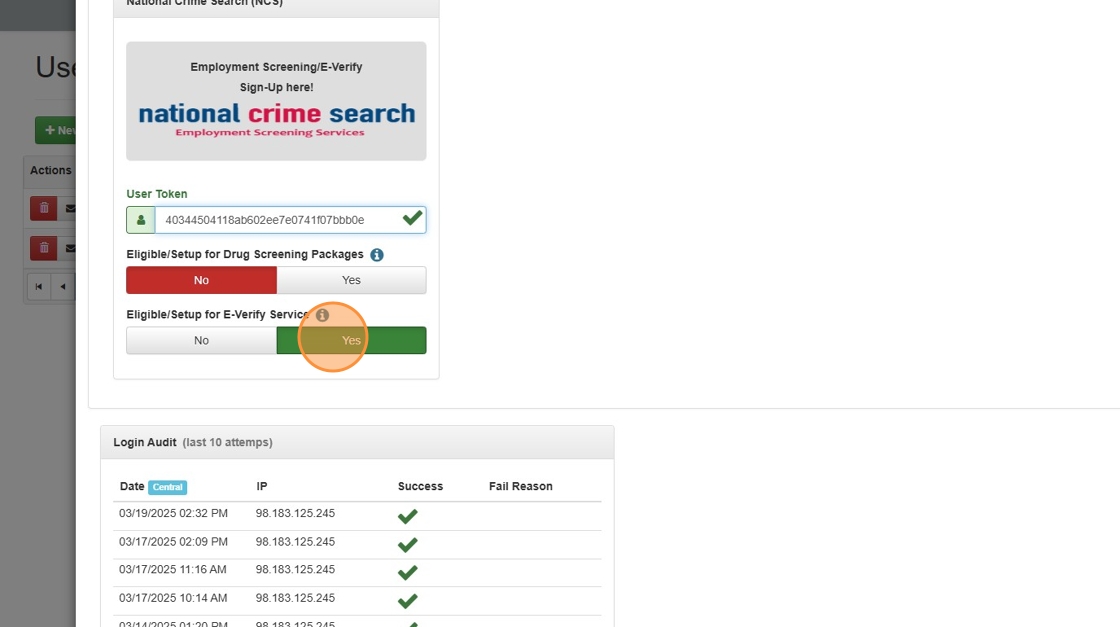
9. Scroll to the “Integration” section and paste (CTRL/Command + V) your API Token under the “User Token” field.

10. Click the “Token” field.

11. Select the appropriate “Eligible/Setup for” switch. In this case, you will select the “Eligible/Setup for E-Verify Service.”
12. Save your changes.

13. At this point, sign out and sign back in to the Integrity-Data HRP to ensure that the API Token is activated.
This must be done before attempting to submit I-9s.

14. Click the “HR Admin” menu.

15. Navigate to the “I-9” menu item under “Employee Maintenance.”

16. Ensure the blue dropdown filter shows “Sec 1 Complete + Sec 2 NOT Complete.” Click the row of whose Section 2 of the I-9 you will complete.

17. Scroll down to complete all applicable fields for Section 2 of the I-9, including your digital signature.

18. IMPORTANT. Once you click “Save and Generate I-9 (Sec 2),” the HRP will send notification to National Crime Search and match the API Token of the User submitting the I-9 with the API Token of the User Account registered with National Crime Search. Their system will then be prompted to forward the completed I-9 to E-Verify.

19. As updates to the I-9 process occur, you will see their status reflected in the “E-Verify” section of the employee’s I-9.

Made with Scribe
Questions / Resources
If you have questions or comments please email support@integrity-data.com.
Last Review: 3/19/2025
Leave A Comment