
- Within the Full Payroll Menu
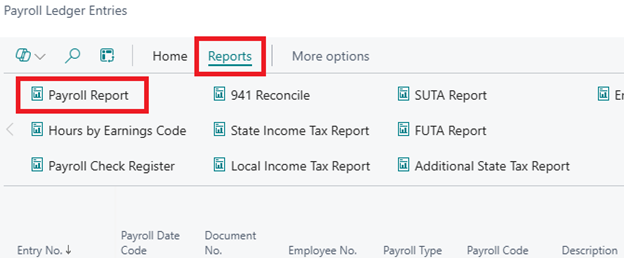
- Under History Column, select Payroll Ledger Entries

- Select Reports at the top to open the ribbon
- Choose “Payroll Report”
From the new screen that opens, you will:
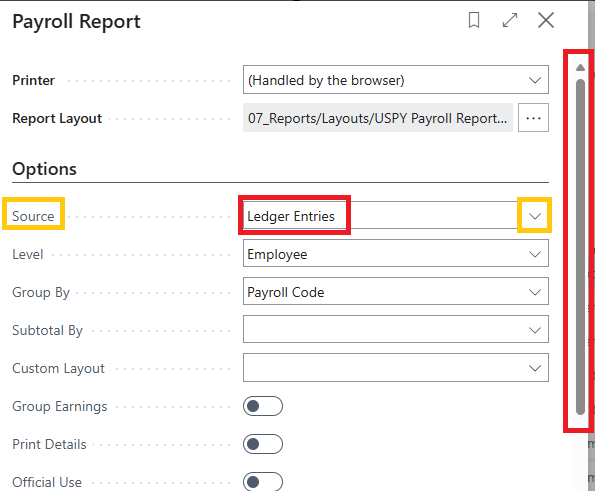
- Click the “Source” dropdown and select “Ledger Entries”
- You will then use the scroll bar on the far right to select all other options according to your desired outcome.
Once you are at the “Filter: Filters” section, you have many options.
- AS SHOWN IN THE IMAGE BELOW you can filter, per your desired outcome, by:
- Employee No.
- Payroll Code
- Payroll Type
- Payment Date
- Posting Date
- Document No.
- State

Once you have set up your options for the desired outcome:
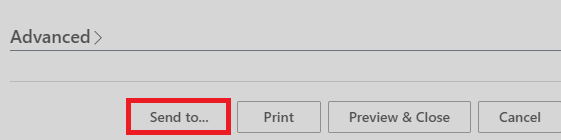
- Select “Send to…” at the bottom of the report setup page
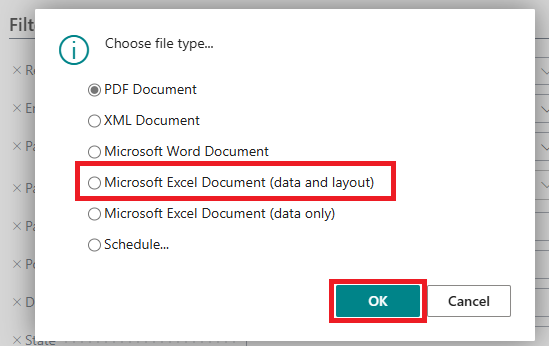
- Select ” Microsoft Excel Document (data and layout)”
Questions / Resources
If you have questions or comments please email support@integrity-data.com.
Last Review:6/9/2025
Leave A Comment