
Step 1: Accessing Payroll Ledger Entries
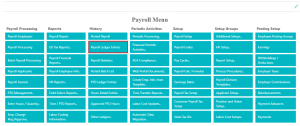
Navigate to the ‘Full Payroll Menu’ and locate the ‘History’ column. Click on ‘Payroll Ledger Entries’ to access the ledger.
You can see available actions. Here is a description of their functions.
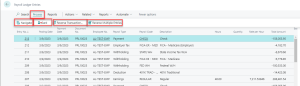
NAVIGATE:
This action enables you to find all entries and documents associated with a specific document number and posting date selected in the entry.
CARD:
This action will direct you to the employee card linked with the chosen payroll document, providing further details.
REVERSE TRANSACTION ENTRIES:
This action guides you to the ‘Reverse Transaction Entries’ table. Here, you can select the entries you wish to reverse, proceed to process, and then execute the reversal. Corresponding journal entries will be automatically posted to the ledger.
REVERSE MULTIPLE ENTRIES:
This feature allows you to apply a filter to select and reverse multiple entries simultaneously. Once selected, the chosen entries will undergo reversal along with the generation of corresponding journal entries.
Questions / Resources
If you have questions or comments please email support@integrity-data.com.
Last Review: 04/21/2024
Leave A Comment