
Payroll now provides users with a convenient method for accessing and managing all posted payroll documents directly within the system. This article serves as a detailed guide, outlining step-by-step instructions for accessing these documents and explaining the various functions available for effective management.
Step 1:Access Posted Payroll Processing
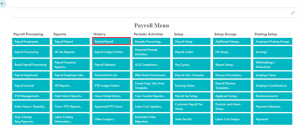
To access it, simply click “Posted Payroll” in the ‘History’ column of the Full Payroll menu.
You can see available actions. Here is a description of their functions.
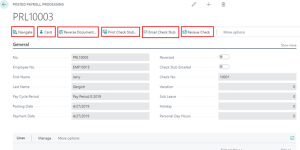
Navigate: This function allows you to review and drill into individual entries related to the posted payroll document across various ledgers, including G/L, Vendor Ledger, Detailed Vendor Ledger, Bank Account Ledger, Check Ledger, Posted Payroll Header, and Payroll Ledger Entry.
Card: Clicking on this option will take you directly to the employee card associated with the selected payroll document.
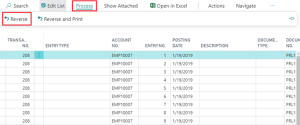
Reverse Document: Selecting this option opens the ‘Reverse Transaction Entries’ table, where you can choose specific entries to reverse. After selecting, click ‘Process’ and then ‘Reverse’ to execute the reversal.
Print Check Stub: Use this option to reprint the check stub for the selected posted payroll document.
Email Check Stub: Select this function to email the check stub for the specified posted payroll documents.
Reissue Check: If needed, you can reissue a live check, but ensure that the entries created by the initial check haven’t been applied against yet.
Questions / Resources
If you have questions or comments please email support@integrity-data.com.
Last Review: 04/21/2024
Leave A Comment