
If you have ever moved to a new house, you understand what it takes to pack up years of life, load it on a truck, and then unpack it all at the new place. The effort can feel overwhelming! Now think of moving your organization’s payroll solution. It brings similar feelings of excitement for something new and modern mixed with nervousness about moving all that sensitive payroll data. In this article, we will discuss how to have a successful move to your new payroll solution and even use it as a way to clean up your data so you can enjoy a shiny new system with all the modern bells and whistles.
Why Make the Switch?
Let’s face it: Microsoft Dynamics GP Payroll has been a reliable workhorse, but with Microsoft announcing GP’s sunset, sticking with it is like insisting on using dial-up internet in 2025. Modern payroll isn’t just about cutting checks; it’s about strategy, compliance, and employee experience. Payroll NOW, built into Microsoft Dynamics 365 Business Central, offers cloud accessibility, automation, and compliance confidence—plus, it’s designed to work seamlessly with the rest of our HR solutions in our Integrity Data HRP solution stack for Business Central.
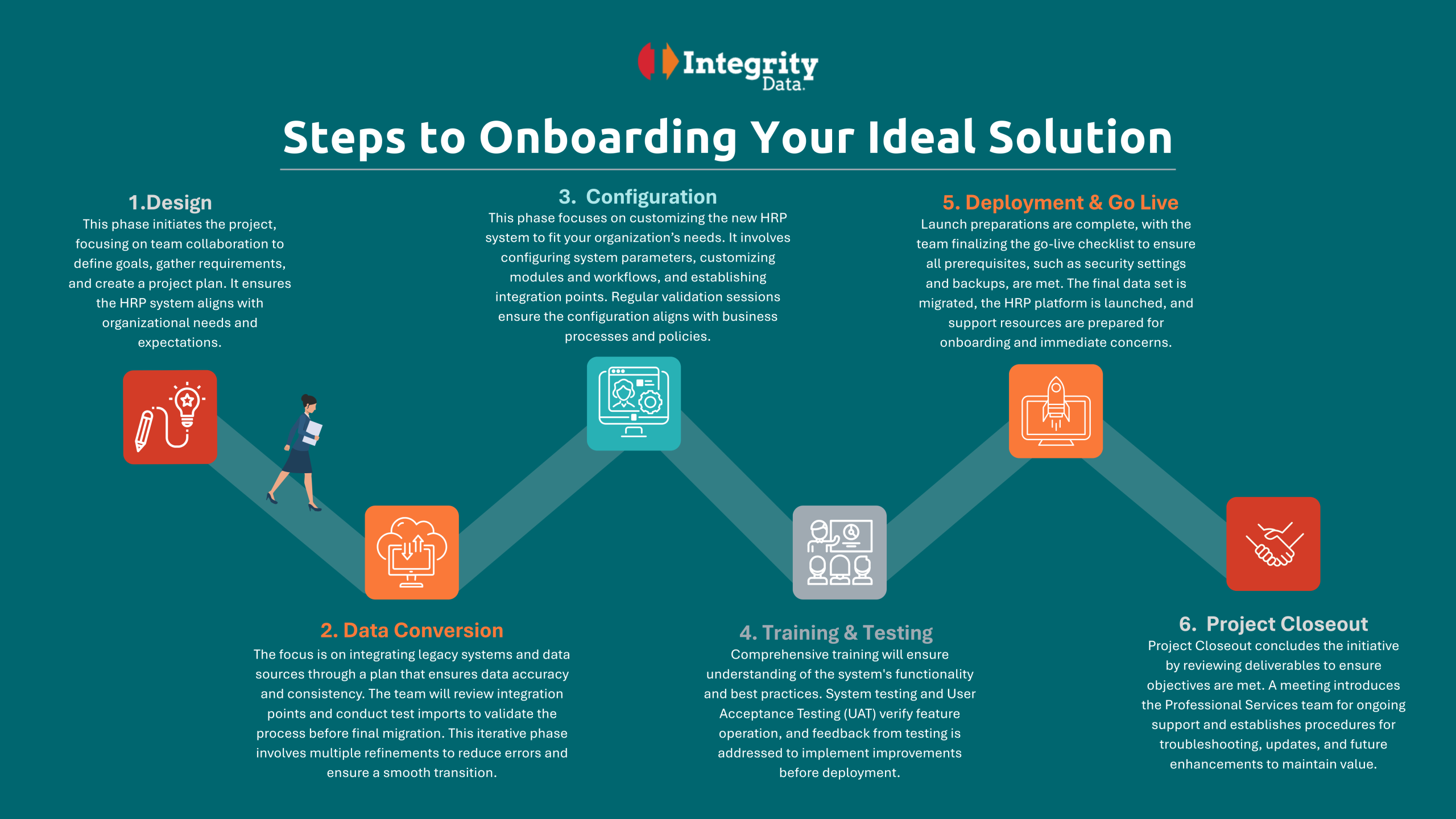
Download PDF of this infographic to read small print
Step 1: Design—Start with a Plan, Not Panic
Every great migration starts with a solid plan. The Design phase is all about team collaboration: define your goals, gather requirements, and create a project plan that ensures your new HRP system aligns with your organization’s needs and expectations. Think of it as plotting your route before you hit the road—no one wants to end up in Payroll Purgatory.
Step 2: Data Conversion—Don’t Bring the Junk Drawer
Migrating payroll data isn’t just about moving numbers; it’s about integrating legacy systems and data sources with accuracy and consistency. The Data Conversion phase involves reviewing integration points, conducting test imports, and refining the process to reduce errors. It’s the perfect time to clean house—ditch those outdated pay codes from 1998 and make sure only the essentials make the move.
Step 3: Configuration—Personalize Like a Pro
Now comes the fun part: personalizing Payroll NOW to fit your organization’s needs. This phase involves configuring system parameters, customizing modules and workflows, and establishing integration points. Regular validation sessions ensure everything aligns with your business processes and policies. It’s like setting up the furniture in your new home just the way you like it.
Step 4: Training & Testing—No Surprises Allowed
Comprehensive training ensures your team understands the system’s functionality and best practices. System testing and User Acceptance Testing (UAT) verify that features work as intended, and feedback from testing is used to make improvements before deployment. Think of it as a dress rehearsal for your payroll performance—no one wants to miss their cue on payday.
Step 5: Deployment & Go Live—Ready, Set, Payroll!
Launch preparations are complete, the go-live checklist is finalized, and all prerequisites (like security settings and backups) are met. The final data set is migrated, the HRP platform is launched, and support resources are ready for onboarding and immediate concerns. It’s showtime—your new payroll system is live, and you’re ready to impress the crowd.
Step 6: Project Closeout—Celebrate and Support
Project Closeout wraps up the initiative by reviewing deliverables to ensure objectives are met. A meeting introduces the Professional Services team for ongoing support and establishes procedures for troubleshooting, updates, and future enhancements.
Final Thoughts: Make the Move, Enjoy the Perks
Switching payroll systems doesn’t have to be a nightmare. With Payroll NOW and Integrity Data’s proven onboarding process, you’re not just moving data—you’re moving forward. So grab your metaphorical moving boxes, leave GP behind, and step into a future where payroll is automated, integrated, and (dare we say) enjoyable.
Ready to make the switch?
Contact Integrity Data for a personalized payroll migration plan and let Payroll NOW do the heavy lifting. Your team will thank you.
Integrity Data HRP – Your Complete HR Solution Stack for Dynamics Including Payroll for BC
Integrity Data HRP is your complete HR, Time Management, and Payroll platform from within Dynamics GP and D365 BC. Everything works together effortlessly so you can focus on what really matters, your people.
- Escape the piles of paper and keep everything in one digital employee file.
- From Applicant to Retirement, you can manage Recruitment & Onboarding, Benefit Elections, Performance Reviews, Certifications & Licenses, Reports, Payroll, Time & Attendance, and much more, all in one solution.
- Employee Self-Service Portal is included for both Business Central and GP.
- Full-Service Tax Filing and ACA Reporting Services available as well.
Reach out today and our no-pressure solution experts will answer your questions to see if we are a good fit for your organization.
Integrity Data has been serving the Dynamics community since 1996. Our passion is to help HR and payroll professionals own their time so they can focus on helping their people. As always, your people are our priority.

Leave A Comment