
KB15-012
Reversing Multiple Checks
- Go to the Full Payroll Menu -> History -> Payroll Ledger Entries

-
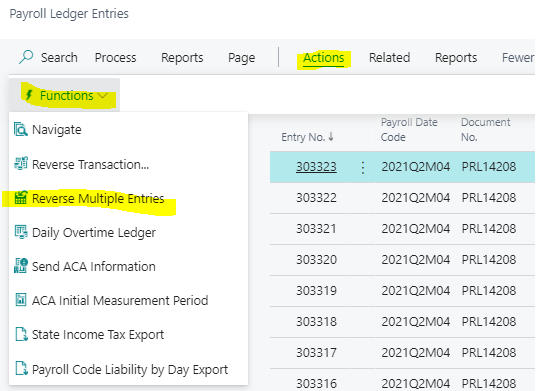
- Click Actions -> Functions -> Reverse Multiple Entries
-
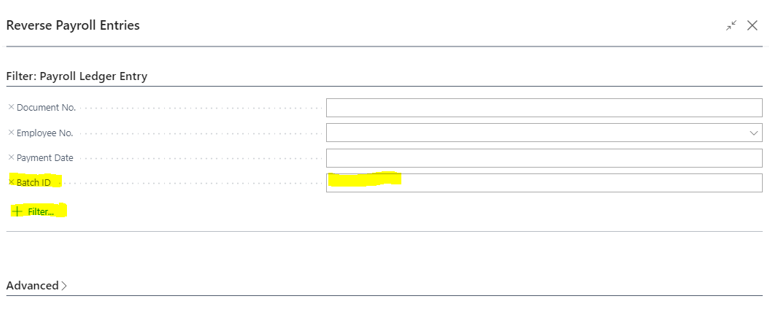
- Reverse Payroll Entries Window will open
- Default Filters are:
- Document No.
- Employee No.
- Payment Date
- Default Filters are:
- Reverse Payroll Entries Window will open
-
-
- Add a Filter for something specific to the documents to reverse. Example is Batch ID
- Add the filter using the + Filter option -> Chose Batch ID -> then enter the Batch ID to Reverse
- Then press OK
- Add a Filter for something specific to the documents to reverse. Example is Batch ID
-
Questions / Resources
If you have questions or comments please email Support@integrity-data.com.
If you would like to search for information and resources for Integrity Data products check out the following sites:
- Knowledge Base: https://www.integrity-data.com/knowledge-base/
- Videos: https://www.integrity-data.com/video-library
Last Review: 6/10/2021 – Revision: 0.0
Applies To: Payroll NOW
Keywords: Reversing, Checks
Categories: Payroll NOW
Leave A Comment